
NEST
Configuration options
Continuous time spiking
In traditional simulation schemes spikes are constrained to an equidistant time grid. However, for some neuron models, NEST has the capability to represent spikes in continuous time.
At setup the user can choose the continuous time scheme
setup(spike_precision='off_grid')
or the conventional grid-constrained scheme
setup(spike_precision='on_grid')
where ‘off_grid’ is the default.
The following PyNN standard models have an off-grid
implementation: IF_curr_exp, SpikeSourcePoisson
EIF_cond_alpha_isfa_ista.
Todo
add a list of native NEST models with off-grid capability
Here is an example showing how to specify the option in a PyNN script and an illustration of the different outcomes:
import numpy as np
from pyNN.nest import *
import matplotlib.pyplot as plt


def test_sim(on_or_off_grid, sim_time):
    setup(timestep=1.0, min_delay=1.0, max_delay=1.0, spike_precision=on_or_off_grid)
    src = Population(1, SpikeSourceArray(spike_times=[0.5]))
    cm = 250.0
    tau_m = 10.0
    tau_syn_E = 1.0
    weight = cm / tau_m * np.power(tau_syn_E / tau_m, -tau_m / (tau_m - tau_syn_E)) * 20.5
    nrn = Population(1, IF_curr_exp(cm=cm, tau_m=tau_m, tau_syn_E=tau_syn_E,
                                    tau_refrac=2.0, v_thresh=20.0, v_rest=0.0,
                                    v_reset=0.0, i_offset=0.0))
    nrn.initialize(v=0.0)
    prj = Projection(src, nrn, OneToOneConnector(), StaticSynapse(weight=weight))
    nrn.record('v')
    run(sim_time)
    return nrn.get_data().segments[0].analogsignals[0]


sim_time = 10.0
off = test_sim('off_grid', sim_time)
on = test_sim('on_grid', sim_time)


def plot_data(pos, on, off, ylim, with_legend=False):
    ax = plt.subplot(1, 2, pos)
    ax.plot(off.times, off, color='0.7', linewidth=7, label='off-grid')
    ax.plot(on.times, on, 'k', label='on-grid')
    ax.set_ylim(*ylim)
    ax.set_xlim(0, 9)
    ax.set_xlabel('time [ms]')
    ax.set_ylabel('V [mV]')
    if with_legend:
        plt.legend()


plot_data(1, on, off, (-0.5, 21), with_legend=True)
plot_data(2, on, off, (-0.05, 2.1))
plt.show()
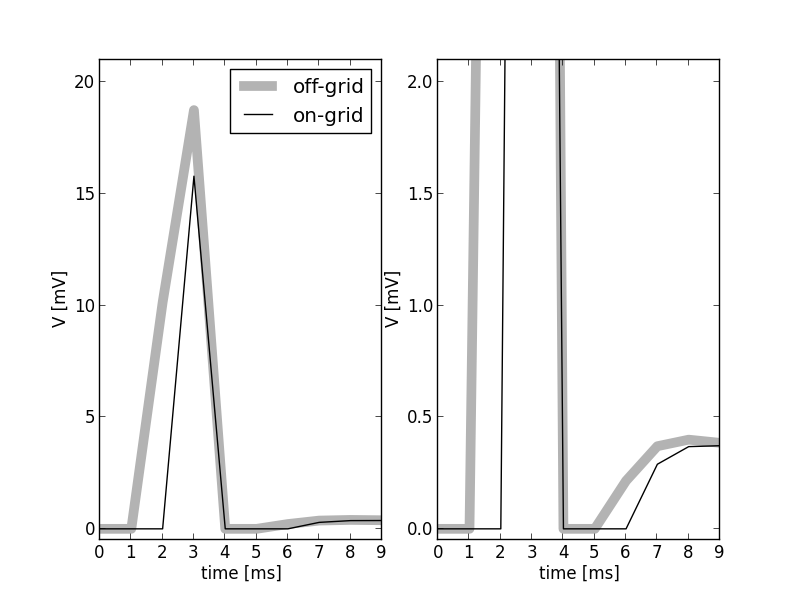
The gray curve shows the membrane potential excursion in response to an input spike arriving at the neuron at t = 1.5 ms (left panel, the right panel shows an enlargement at low voltages). The amplitude of the post-current has an unrealistically high value such that the threshold voltage for spike generation is crossed. The membrane potential is recorded in intervals of 1 ms. Therefore the first non-zero value is measured at t = 2 ms. The threshold is crossed somewhere in the interval (3 ms, 4 ms], resulting in a voltage of 0 at t = 4 ms. The membrane potential is clamped to 0 for 2 ms, the refractory period. Therefore, the neuron recovers from refractoriness somewhere in the interval (5 ms, 6 ms] and the next non-zero voltage is observed at t = 6 ms. The black curve shows the results of the same model now integrated with a grid constrained simulation scheme with a computation step size of 1 ms. The input spike is mapped to the next grid position and therefore arrives at t = 2 ms. The first non-zero voltage is observed at t = 3 ms. The output spike is emitted at t = 4 ms and this is the time at which the membrane potential is reset. Consequently, the model neuron returns from refractoriness at exactly t = 6 ms. The next non-zero membrane potential value is observed at t = 7 ms.
The following publication describes how the continuous time mode is implemented in NEST and compares the performance of different approaches:
Hanuschkin A, Kunkel S, Helias M, Morrison A and Diesmann M (2010) A general and efficient method for incorporating precise spike times in globally time-driven simulations. Front. Neuroinform. 4:113. doi:10.3389/fninf.2010.00113
Random number generator
To set the seed for the NEST random number generator:
setup(rng_seed=12345)
You can also choose the type of RNG:
setup(rng_type="Philox_32", rng_seed=12345)
Using native cell models
To use a NEST neuron model with PyNN, we wrap the NEST model with a PyNN
NativeCellType class, e.g.:
>>> from pyNN.nest import native_cell_type, Population, run, setup
>>> setup()
0
>>> ht_neuron = native_cell_type('ht_neuron')
>>> poisson = native_cell_type('poisson_generator')
>>> p1 = Population(10, ht_neuron(Tau_m=20.0))
>>> p2 = Population(1, poisson(rate=200.0))
We can now initialize state variables, set/get parameter values, and record from these neurons as from standard cells:
>>> p1.get('Tau_m')
20.0
>>> p1.get('Tau_theta')
2.0
>>> p1.get('C_m')
Traceback (most recent call last):
...
NonExistentParameterError: C_m (valid parameters for ht_neuron are:
  AMPA_E_rev, AMPA_Tau_1, AMPA_Tau_2, AMPA_g_peak, E_K, E_Na, GABA_A_E_rev,
  GABA_A_Tau_1, GABA_A_Tau_2, GABA_A_g_peak, GABA_B_E_rev, GABA_B_Tau_1,
  GABA_B_Tau_2, GABA_B_g_peak, KNa_E_rev, KNa_g_peak, NMDA_E_rev, NMDA_Sact,
  NMDA_Tau_1, NMDA_Tau_2, NMDA_Vact, NMDA_g_peak, NaP_E_rev, NaP_g_peak,
  T_E_rev, T_g_peak, Tau_m, Tau_spike, Tau_theta, Theta_eq, g_KL, g_NaL,
  h_E_rev, h_g_peak, spike_duration)
>>> p1.initialize(V_m=-70.0, Theta=-50.0)
>>> p1.record('V_m')
>>> run(250.0)
250.0
>>> output = p1.get_data()
To connect populations of native cells, you need to know the available synaptic receptor types:
>>> ht_neuron.receptor_types
['NMDA', 'AMPA', 'GABA_A', 'GABA_B']
>>> from pyNN.nest import Projection, AllToAllConnector
>>> connector = AllToAllConnector()
>>> prj_ampa = Projection(p2, p1, connector, receptor_type='AMPA')
>>> prj_nmda = Projection(p2, p1, connector, receptor_type='NMDA')
Using native synaptic plasticity models
To use a NEST STDP model with PyNN, we use the native_synapse_type()
function:
>>> from pyNN.nest import native_synapse_type
>>> stdp = native_synapse_type("stdp_synapse")(**{"Wmax": 50.0, "lambda": 0.015})
>>> prj_plastic = Projection(p1, p1, connector, receptor_type='AMPA', synapse_type=stdp)
Common synapse properties
Some NEST synapse models (e.g. stdp_facetshw_synapse_hom) make use of
common synapse properties to conserve memory. This has the following
implications for their usage in PyNN:
Common properties can only have one homogeneous value per projection. Trying to assign heterogeneous values will result in a
ValueError.Common properties can currently not be retrieved using
Projection.get. However, they will only deviate from the default when changed manually.
Using models defined in NESTML
NESTML is a domain-specific language for defining neuron and synapse models that can be
compiled to efficient C++ code for use in NEST. PyNN wraps PyNESTML to compile and install
NESTML models automatically at sim.setup() time.
Installation
NESTML support requires the nestml package (imported as pynestml), which is not
installed by default:
pip install PyNN[nestml]   # installs PyNN together with nestml
# or
pip install nestml         # installs nestml into an existing PyNN environment
Important: register models before sim.setup()
All NESTML models registered for a simulation are compiled together in a single PyNESTML
pass when sim.setup() is called. Both nestml_cell_type() and
nestml_synapse_type() must therefore be called before sim.setup(). Calling
them afterwards raises a RuntimeError.
The required call order is:
import pyNN.nest as sim
from pyNN.nest import nestml

# 1. Register NESTML models — no compilation yet
MyNeuron = nestml.nestml_cell_type("my_neuron", "my_neuron.nestml")

# 2. setup() triggers the single compile + install pass
sim.setup(timestep=0.1, min_delay=1.0)

# 3. MyNeuron now behaves identically to native_cell_type() results
pop = sim.Population(100, MyNeuron(param=value))
NESTML neuron models
Use nestml_cell_type() with the model name and either a path to a
.nestml file or a string containing NESTML source code inline:
# From a file
MyNeuron = nestml.nestml_cell_type("my_neuron", "/path/to/my_neuron.nestml")

# Inline NESTML source
nestml_source = """
model my_neuron:
    ...
"""
MyNeuron = nestml.nestml_cell_type("my_neuron", nestml_source)
After sim.setup() the returned class behaves identically to one returned by
native_cell_type(): parameters can be set, state variables initialised, and
variables recorded in the usual way.
See examples/nestml/wang_buzsaki_synaptic_input.py for a file-based example and
examples/nestml/wang_buzsaki_current_injection.py for the inline variant.
NESTML synapse models
Use nestml_synapse_type() to register a synapse model. The
weight_variable and delay_variable arguments identify which variables in the NESTML
model correspond to the connection weight and dendritic delay respectively:
TsodyksSyn = nestml.nestml_synapse_type(
    "tsodyks_synapse_nestml",
    "/path/to/tsodyks_synapse.nestml",
    weight_variable="w",
    delay_variable="d",
)
sim.setup(timestep=0.1, min_delay=1.0)

prj = sim.Projection(
    source, target,
    sim.AllToAllConnector(),
    TsodyksSyn(weight=1.0, delay=1.0),
    receptor_type="excitatory",
)
Plastic synapses requiring co-generation
Some NESTML plasticity models (such as STDP) must be co-generated with a specific
postsynaptic neuron model so that PyNESTML can wire up the pre/post spike communication.
Pass the neuron description via postsynaptic_neuron_nestml_description; the
co-generated neuron class is then accessible as an attribute of the synapse class before
and after sim.setup():
stdp = nestml.nestml_synapse_type(
    "stdp_synapse",
    "stdp_synapse.nestml",
    postsynaptic_neuron_nestml_description="iaf_psc_exp_neuron.nestml",
)
PostNeuron = stdp.postsynaptic_cell_type  # available immediately, before setup()

sim.setup(timestep=0.1, min_delay=1.0)

source = sim.Population(10, sim.SpikeSourcePoisson(rate=50.0))
target = sim.Population(10, PostNeuron())
prj = sim.Projection(source, target, sim.AllToAllConnector(),
                     stdp(weight=1.0, delay=1.0), receptor_type="excitatory")
See examples/nestml/stdp.py for a complete working example.
Future backends
NESTML support is currently specific to the NEST backend. The SpiNNaker backend (developed separately as sPyNNaker) also has partial NESTML support, and it is hoped that other backends may gain NESTML support in future.